---
productId: material-ui
title: React Text Field component
components: FilledInput, FormControl, FormHelperText, Input, InputAdornment, InputBase, InputLabel, OutlinedInput, TextField
githubLabel: 'scope: text field'
materialDesign: https://m2.material.io/components/text-fields
githubSource: packages/mui-material/src/TextField
---
# Text Field
Text Fields let users enter and edit text.
Text fields allow users to enter text into a UI. They typically appear in forms and dialogs.
## Basic TextField
The `TextField` wrapper component is a complete form control including a label, input, and help text.
It comes with three variants: outlined (default), filled, and standard.
```tsx
import Box from '@mui/material/Box';
import TextField from '@mui/material/TextField';
export default function BasicTextFields() {
return (
:not(style)': { m: 1, width: '25ch' } }}
noValidate
autoComplete="off"
>
);
}
```
:::info
The standard variant of the Text Field is no longer documented in the [Material Design guidelines](https://m2.material.io/)
([this article explains why](https://medium.com/google-design/the-evolution-of-material-designs-text-fields-603688b3fe03)),
but Material UI will continue to support it.
:::
## Form props
Standard form attributes are supported, for example `required`, `disabled`, `type`, etc. as well as a `helperText` which is used to give context about a field's input, such as how the input will be used.
```tsx
import Box from '@mui/material/Box';
import TextField from '@mui/material/TextField';
export default function FormPropsTextFields() {
return (
);
}
```
## Controlling the HTML input
Use `slotProps.htmlInput` to pass attributes to the underlying `` element.
```jsx
```
The rendered HTML input will look like this:
```html
```
:::warning
`slotProps.htmlInput` is not the same as `slotProps.input`.
`slotProps.input` refers to the React `` component that's rendered based on the specified variant prop.
`slotProps.htmlInput` refers to the HTML `` element rendered within that Input component, regardless of the variant.
:::
## Validation
The `error` prop toggles the error state.
The `helperText` prop can then be used to provide feedback to the user about the error.
```tsx
import Box from '@mui/material/Box';
import TextField from '@mui/material/TextField';
export default function ValidationTextFields() {
return (
);
}
```
## Multiline
The `multiline` prop transforms the Text Field into a [Textarea Autosize](/material-ui/react-textarea-autosize/) element.
Unless the `rows` prop is set, the height of the text field dynamically matches its content.
You can use the `minRows` and `maxRows` props to bound it.
```tsx
import Box from '@mui/material/Box';
import TextField from '@mui/material/TextField';
export default function MultilineTextFields() {
return (
);
}
```
## Select
The `select` prop makes the text field use the [Select](/material-ui/react-select/) component internally.
```tsx
import Box from '@mui/material/Box';
import TextField from '@mui/material/TextField';
import MenuItem from '@mui/material/MenuItem';
const currencies = [
{
value: 'USD',
label: '$',
},
{
value: 'EUR',
label: '€',
},
{
value: 'BTC',
label: '฿',
},
{
value: 'JPY',
label: '¥',
},
];
export default function SelectTextFields() {
return (
);
}
```
## Icons
There are multiple ways to display an icon with a text field.
```tsx
import Box from '@mui/material/Box';
import Input from '@mui/material/Input';
import InputLabel from '@mui/material/InputLabel';
import InputAdornment from '@mui/material/InputAdornment';
import FormControl from '@mui/material/FormControl';
import TextField from '@mui/material/TextField';
import AccountCircle from '@mui/icons-material/AccountCircle';
export default function InputWithIcon() {
return (
:not(style)': { m: 1 } }}>
With a start adornment
}
/>
),
},
}}
variant="standard"
/>
);
}
```
### Input Adornments
The main way is with an `InputAdornment`.
This can be used to add a prefix, a suffix, or an action to an input.
For instance, you can use an icon button to hide or reveal the password.
```tsx
import * as React from 'react';
import Box from '@mui/material/Box';
import IconButton from '@mui/material/IconButton';
import Input from '@mui/material/Input';
import FilledInput from '@mui/material/FilledInput';
import OutlinedInput from '@mui/material/OutlinedInput';
import InputLabel from '@mui/material/InputLabel';
import InputAdornment from '@mui/material/InputAdornment';
import FormHelperText from '@mui/material/FormHelperText';
import FormControl from '@mui/material/FormControl';
import TextField from '@mui/material/TextField';
import Visibility from '@mui/icons-material/Visibility';
import VisibilityOff from '@mui/icons-material/VisibilityOff';
export default function InputAdornments() {
const [showPassword, setShowPassword] = React.useState(false);
const handleClickShowPassword = () => setShowPassword((show) => !show);
const handleMouseDownPassword = (event: React.MouseEvent) => {
event.preventDefault();
};
const handleMouseUpPassword = (event: React.MouseEvent) => {
event.preventDefault();
};
return (
);
}
```
#### Customizing adornments
You can apply custom styles to adornments, and trigger changes to one based on attributes from another.
For example, the demo below uses the label's `[data-shrink=true]` attribute to make the suffix visible (via opacity) when the label is in its shrunken state.
```tsx
import Box from '@mui/material/Box';
import { filledInputClasses } from '@mui/material/FilledInput';
import { inputBaseClasses } from '@mui/material/InputBase';
import TextField from '@mui/material/TextField';
import InputAdornment from '@mui/material/InputAdornment';
export default function InputSuffixShrink() {
return (
:not(style)': { m: 1, width: '25ch' } }}
noValidate
autoComplete="off"
>
&`]: {
opacity: 1,
},
}}
>
lbs
),
},
}}
/>
&`]: {
opacity: 1,
},
}}
>
days
),
},
}}
/>
&`]: {
opacity: 1,
},
}}
>
@gmail.com
),
},
}}
/>
);
}
```
## Sizes
Fancy smaller inputs? Use the `size` prop.
```tsx
import Box from '@mui/material/Box';
import TextField from '@mui/material/TextField';
export default function TextFieldSizes() {
return (
);
}
```
The `filled` variant input height can be further reduced by rendering the label outside of it.
```tsx
import Stack from '@mui/material/Stack';
import TextField from '@mui/material/TextField';
export default function TextFieldHiddenLabel() {
return (
);
}
```
## Margin
The `margin` prop can be used to alter the vertical spacing of the text field.
Using `none` (default) doesn't apply margins to the `FormControl` whereas `dense` and `normal` do.
```tsx
import Box from '@mui/material/Box';
import TextField from '@mui/material/TextField';
function RedBar() {
return (
({
height: 20,
backgroundColor: 'rgba(255, 0, 0, 0.1)',
...theme.applyStyles('dark', {
backgroundColor: 'rgb(255 132 132 / 25%)',
}),
})}
/>
);
}
export default function LayoutTextFields() {
return (
);
}
```
## Full width
`fullWidth` can be used to make the input take up the full width of its container.
```tsx
import Box from '@mui/material/Box';
import TextField from '@mui/material/TextField';
export default function FullWidthTextField() {
return (
);
}
```
## Uncontrolled vs. Controlled
The component can be controlled or uncontrolled.
:::info
- A component is **controlled** when it's managed by its parent using props.
- A component is **uncontrolled** when it's managed by its own local state.
Learn more about controlled and uncontrolled components in the [React documentation](https://react.dev/learn/sharing-state-between-components#controlled-and-uncontrolled-components).
:::
```tsx
import * as React from 'react';
import Box from '@mui/material/Box';
import TextField from '@mui/material/TextField';
export default function StateTextFields() {
const [name, setName] = React.useState('Cat in the Hat');
return (
:not(style)': { m: 1, width: '25ch' } }}
noValidate
autoComplete="off"
>
) => {
setName(event.target.value);
}}
/>
);
}
```
## Components
`TextField` is composed of smaller components (
[`FormControl`](/material-ui/api/form-control/),
[`Input`](/material-ui/api/input/),
[`FilledInput`](/material-ui/api/filled-input/),
[`InputLabel`](/material-ui/api/input-label/),
[`OutlinedInput`](/material-ui/api/outlined-input/),
and [`FormHelperText`](/material-ui/api/form-helper-text/)
) that you can leverage directly to significantly customize your form inputs.
You might also have noticed that some native HTML input properties are missing from the `TextField` component.
This is on purpose.
The component takes care of the most used properties.
Then, it's up to the user to use the underlying component shown in the following demo. Still, you can use `slotProps.htmlInput` (and `slotProps.input`, `slotProps.inputLabel` properties) if you want to avoid some boilerplate.
```tsx
import Box from '@mui/material/Box';
import FilledInput from '@mui/material/FilledInput';
import FormControl from '@mui/material/FormControl';
import FormHelperText from '@mui/material/FormHelperText';
import Input from '@mui/material/Input';
import InputLabel from '@mui/material/InputLabel';
import OutlinedInput from '@mui/material/OutlinedInput';
export default function ComposedTextField() {
return (
:not(style)': { m: 1 } }}
noValidate
autoComplete="off"
>
NameName
Some important helper text
NameDisabledNameErrorNameName
);
}
```
## Inputs
```tsx
import Box from '@mui/material/Box';
import Input from '@mui/material/Input';
const ariaLabel = { 'aria-label': 'description' };
export default function Inputs() {
return (
:not(style)': { m: 1 } }}
noValidate
autoComplete="off"
>
);
}
```
## Color
The `color` prop changes the highlight color of the text field when focused.
```tsx
import Box from '@mui/material/Box';
import TextField from '@mui/material/TextField';
export default function ColorTextFields() {
return (
:not(style)': { m: 1, width: '25ch' } }}
noValidate
autoComplete="off"
>
);
}
```
## Customization
Here are some examples of customizing the component.
You can learn more about this in the [overrides documentation page](/material-ui/customization/how-to-customize/).
### Using the styled API
```tsx
import { alpha, styled } from '@mui/material/styles';
import InputBase from '@mui/material/InputBase';
import Box from '@mui/material/Box';
import InputLabel from '@mui/material/InputLabel';
import TextField, { TextFieldProps } from '@mui/material/TextField';
import FormControl from '@mui/material/FormControl';
import { OutlinedInputProps } from '@mui/material/OutlinedInput';
const CssTextField = styled(TextField)({
'& label.Mui-focused': {
color: '#A0AAB4',
},
'& .MuiInput-underline:after': {
borderBottomColor: '#B2BAC2',
},
'& .MuiOutlinedInput-root': {
'& fieldset': {
borderColor: '#E0E3E7',
},
'&:hover fieldset': {
borderColor: '#B2BAC2',
},
'&.Mui-focused fieldset': {
borderColor: '#6F7E8C',
},
},
});
const BootstrapInput = styled(InputBase)(({ theme }) => ({
'label + &': {
marginTop: theme.spacing(3),
},
'& .MuiInputBase-input': {
borderRadius: 4,
position: 'relative',
backgroundColor: '#F3F6F9',
border: '1px solid',
borderColor: '#E0E3E7',
fontSize: 16,
width: 'auto',
padding: '10px 12px',
transition: theme.transitions.create([
'border-color',
'background-color',
'box-shadow',
]),
// Use the system font instead of the default Roboto font.
fontFamily: [
'-apple-system',
'BlinkMacSystemFont',
'"Segoe UI"',
'Roboto',
'"Helvetica Neue"',
'Arial',
'sans-serif',
'"Apple Color Emoji"',
'"Segoe UI Emoji"',
'"Segoe UI Symbol"',
].join(','),
'&:focus': {
boxShadow: `${alpha(theme.palette.primary.main, 0.25)} 0 0 0 0.2rem`,
borderColor: theme.palette.primary.main,
},
...theme.applyStyles('dark', {
backgroundColor: '#1A2027',
borderColor: '#2D3843',
}),
},
}));
const RedditTextField = styled((props: TextFieldProps) => (
,
}}
{...props}
/>
))(({ theme }) => ({
'& .MuiFilledInput-root': {
overflow: 'hidden',
borderRadius: 4,
border: '1px solid',
backgroundColor: '#F3F6F9',
borderColor: '#E0E3E7',
transition: theme.transitions.create([
'border-color',
'background-color',
'box-shadow',
]),
'&:hover': {
backgroundColor: 'transparent',
},
'&.Mui-focused': {
backgroundColor: 'transparent',
boxShadow: `${alpha(theme.palette.primary.main, 0.25)} 0 0 0 2px`,
borderColor: theme.palette.primary.main,
},
...theme.applyStyles('dark', {
backgroundColor: '#1A2027',
borderColor: '#2D3843',
}),
},
}));
const ValidationTextField = styled(TextField)({
'& input:valid + fieldset': {
borderColor: '#E0E3E7',
borderWidth: 1,
},
'& input:invalid + fieldset': {
borderColor: 'red',
borderWidth: 1,
},
'& input:valid:focus + fieldset': {
borderLeftWidth: 4,
padding: '4px !important', // override inline-style
},
});
export default function CustomizedInputsStyled() {
return (
Bootstrap
);
}
```
### Using the theme style overrides API
Use the `styleOverrides` key to change any style injected by Material UI into the DOM.
See the [theme style overrides](/material-ui/customization/theme-components/#theme-style-overrides) documentation for further details.
```tsx
import TextField from '@mui/material/TextField';
import { outlinedInputClasses } from '@mui/material/OutlinedInput';
import Box from '@mui/material/Box';
import { createTheme, ThemeProvider, Theme, useTheme } from '@mui/material/styles';
const customTheme = (outerTheme: Theme) =>
createTheme({
palette: {
mode: outerTheme.palette.mode,
},
components: {
MuiTextField: {
styleOverrides: {
root: {
'--TextField-brandBorderColor': '#E0E3E7',
'--TextField-brandBorderHoverColor': '#B2BAC2',
'--TextField-brandBorderFocusedColor': '#6F7E8C',
'& label.Mui-focused': {
color: 'var(--TextField-brandBorderFocusedColor)',
},
},
},
},
MuiOutlinedInput: {
styleOverrides: {
notchedOutline: {
borderColor: 'var(--TextField-brandBorderColor)',
},
root: {
[`&:hover .${outlinedInputClasses.notchedOutline}`]: {
borderColor: 'var(--TextField-brandBorderHoverColor)',
},
[`&.Mui-focused .${outlinedInputClasses.notchedOutline}`]: {
borderColor: 'var(--TextField-brandBorderFocusedColor)',
},
},
},
},
MuiFilledInput: {
styleOverrides: {
root: {
'&::before, &::after': {
borderBottom: '2px solid var(--TextField-brandBorderColor)',
},
'&:hover:not(.Mui-disabled, .Mui-error):before': {
borderBottom: '2px solid var(--TextField-brandBorderHoverColor)',
},
'&.Mui-focused:after': {
borderBottom: '2px solid var(--TextField-brandBorderFocusedColor)',
},
},
},
},
MuiInput: {
styleOverrides: {
root: {
'&::before': {
borderBottom: '2px solid var(--TextField-brandBorderColor)',
},
'&:hover:not(.Mui-disabled, .Mui-error):before': {
borderBottom: '2px solid var(--TextField-brandBorderHoverColor)',
},
'&.Mui-focused:after': {
borderBottom: '2px solid var(--TextField-brandBorderFocusedColor)',
},
},
},
},
},
});
export default function CustomizedInputsStyleOverrides() {
const outerTheme = useTheme();
return (
);
}
```
Customization does not stop at CSS.
You can use composition to build custom components and give your app a unique feel.
Below is an example using the [`InputBase`](/material-ui/api/input-base/) component, inspired by Google Maps.
```tsx
import Paper from '@mui/material/Paper';
import InputBase from '@mui/material/InputBase';
import Divider from '@mui/material/Divider';
import IconButton from '@mui/material/IconButton';
import MenuIcon from '@mui/icons-material/Menu';
import SearchIcon from '@mui/icons-material/Search';
import DirectionsIcon from '@mui/icons-material/Directions';
export default function CustomizedInputBase() {
return (
);
}
```
🎨 If you are looking for inspiration, you can check [MUI Treasury's customization examples](https://mui-treasury.com/?path=/docs/textField-introduction--docs).
## `useFormControl`
For advanced customization use cases, a `useFormControl()` hook is exposed.
This hook returns the context value of the parent `FormControl` component.
**API**
```jsx
import { useFormControl } from '@mui/material/FormControl';
```
**Returns**
`value` (_object_):
- `value.adornedStart` (_bool_): Indicate whether the child `Input` or `Select` component has a start adornment.
- `value.setAdornedStart` (_func_): Setter function for `adornedStart` state value.
- `value.color` (_string_): The theme color is being used, inherited from `FormControl` `color` prop .
- `value.disabled` (_bool_): Indicate whether the component is being displayed in a disabled state, inherited from `FormControl` `disabled` prop.
- `value.error` (_bool_): Indicate whether the component is being displayed in an error state, inherited from `FormControl` `error` prop
- `value.filled` (_bool_): Indicate whether input is filled
- `value.focused` (_bool_): Indicate whether the component and its children are being displayed in a focused state
- `value.fullWidth` (_bool_): Indicate whether the component is taking up the full width of its container, inherited from `FormControl` `fullWidth` prop
- `value.hiddenLabel` (_bool_): Indicate whether the label is being hidden, inherited from `FormControl` `hiddenLabel` prop
- `value.required` (_bool_): Indicate whether the label is indicating that the input is required input, inherited from the `FormControl` `required` prop
- `value.size` (_string_): The size of the component, inherited from the `FormControl` `size` prop
- `value.variant` (_string_): The variant is being used by the `FormControl` component and its children, inherited from `FormControl` `variant` prop
- `value.onBlur` (_func_): Should be called when the input is blurred
- `value.onFocus` (_func_): Should be called when the input is focused
- `value.onEmpty` (_func_): Should be called when the input is emptied
- `value.onFilled` (_func_): Should be called when the input is filled
**Example**
```tsx
import * as React from 'react';
import FormControl, { useFormControl } from '@mui/material/FormControl';
import OutlinedInput from '@mui/material/OutlinedInput';
import FormHelperText from '@mui/material/FormHelperText';
function MyFormHelperText() {
const { focused } = useFormControl() || {};
const helperText = React.useMemo(() => {
if (focused) {
return 'This field is being focused';
}
return 'Helper text';
}, [focused]);
return {helperText};
}
export default function UseFormControl() {
return (
);
}
```
## Performance
Global styles for the auto-fill keyframes are injected and removed on each mount and unmount, respectively.
If you are loading a large number of Text Field components at once, it might be a good idea to change this default behavior by enabling [`disableInjectingGlobalStyles`](/material-ui/api/input-base/#input-base-prop-disableInjectingGlobalStyles) in `MuiInputBase`.
Make sure to inject `GlobalStyles` for the auto-fill keyframes at the top of your application.
```jsx
import { GlobalStyles, createTheme, ThemeProvider } from '@mui/material';
const theme = createTheme({
components: {
MuiInputBase: {
defaultProps: {
disableInjectingGlobalStyles: true,
},
},
},
});
export default function App() {
return (
...
);
}
```
## Limitations
### Shrink
The input label "shrink" state isn't always correct.
The input label is supposed to shrink as soon as the input is displaying something.
In some circumstances, we can't determine the "shrink" state (datetime input, Stripe input). You might notice an overlap.
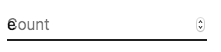
To workaround the issue, you can force the "shrink" state of the label.
```jsx
```
or
```jsx
Count
```
### Floating label
The floating label is absolutely positioned.
It won't impact the layout of the page.
Make sure that the input is larger than the label to display correctly.
### type="number"
:::warning
We do not recommend using `type="number"` with a Text Field due to potential usability issues:
- it allows certain non-numeric characters ('e', '+', '-', '.') and silently discards others
- the functionality of scrolling to increment/decrement the number can cause accidental and hard-to-notice changes
- and more—see [Why the GOV.UK Design System team changed the input type for numbers](https://technology.blog.gov.uk/2020/02/24/why-the-gov-uk-design-system-team-changed-the-input-type-for-numbers/) for a more detailed explanation of the limitations of ``
:::
If you need a text field with number validation, you can use [Number Field](/material-ui/react-number-field/) instead.
### Helper text
The helper text prop affects the height of the text field. If two text fields are placed side by side, one with a helper text and one without, they will have different heights. For example:
```tsx
import Box from '@mui/material/Box';
import TextField from '@mui/material/TextField';
export default function HelperTextMisaligned() {
return (
:not(style)': { m: 1 } }}>
);
}
```
This can be fixed by passing a space character to the `helperText` prop:
```tsx
import Box from '@mui/material/Box';
import TextField from '@mui/material/TextField';
export default function HelperTextAligned() {
return (
:not(style)': { m: 1 } }}>
);
}
```
## Integration with 3rd party input libraries
You can use third-party libraries to format an input.
You have to provide a custom implementation of the `` element with the `inputComponent` property.
The following demo uses the [react-imask](https://github.com/uNmAnNeR/imaskjs) and [react-number-format](https://github.com/s-yadav/react-number-format) libraries. The same concept could be applied to, for example [react-stripe-element](https://github.com/mui/material-ui/issues/16037).
```tsx
import * as React from 'react';
import { IMaskInput } from 'react-imask';
import { NumericFormat } from 'react-number-format';
import Stack from '@mui/material/Stack';
import Input from '@mui/material/Input';
import InputLabel from '@mui/material/InputLabel';
import TextField from '@mui/material/TextField';
import FormControl from '@mui/material/FormControl';
interface CustomProps {
onChange: (event: { target: { name: string; value: string } }) => void;
name: string;
}
const TextMaskCustom = React.forwardRef(
function TextMaskCustom(props, ref) {
const { onChange, ...other } = props;
return (
onChange({ target: { name: props.name, value } })}
overwrite
/>
);
},
);
export default function FormattedInputs() {
const [values, setValues] = React.useState({
textmask: '(100) 000-0000',
numberformat: '1320',
});
const handleChange = (event: React.ChangeEvent) => {
setValues({
...values,
[event.target.name]: event.target.value,
});
};
return (
react-imask
);
}
```
The provided input component should expose a ref with a value that implements the following interface:
```ts
interface InputElement {
focus(): void;
value?: string;
}
```
```jsx
const MyInputComponent = React.forwardRef((props, ref) => {
const { component: Component, ...other } = props;
// implement `InputElement` interface
React.useImperativeHandle(ref, () => ({
focus: () => {
// logic to focus the rendered component from 3rd party belongs here
},
// hiding the value e.g. react-stripe-elements
}));
// `Component` will be your `SomeThirdPartyComponent` from below
return ;
});
// usage
;
```
## Accessibility
In order for the text field to be accessible, **the input should be linked to the label and the helper text**. The underlying DOM nodes should have this structure:
```jsx
We'll never share your email.
```
- If you are using the `TextField` component, you just have to provide a unique `id` unless you're using the `TextField` only client-side.
Until the UI is hydrated `TextField` without an explicit `id` will not have associated labels.
- If you are composing the component:
```jsx
Email addressWe'll never share your email.
```
## Supplementary projects
For more advanced use cases, you might be able to take advantage of:
- [react-hook-form-mui](https://github.com/dohomi/react-hook-form-mui): Material UI and [react-hook-form](https://react-hook-form.com/) combined.
- [formik-material-ui](https://github.com/stackworx/formik-mui): Bindings for using Material UI with [formik](https://formik.org/).
- [mui-rff](https://github.com/lookfirst/mui-rff): Bindings for using Material UI with [React Final Form](https://final-form.org/react).
- [@ui-schema/ds-material](https://www.npmjs.com/package/@ui-schema/ds-material) Bindings for using Material UI with [UI Schema](https://github.com/ui-schema/ui-schema). JSON Schema compatible.
# FilledInput API
## Demos
For examples and details on the usage of this React component, visit the component demo pages:
- [Text Field](https://deploy-preview-47621--material-ui.netlify.app/material-ui/react-text-field/)
## Import
```jsx
import FilledInput from '@mui/material/FilledInput';
// or
import { FilledInput } from '@mui/material';
```
## Props
| Name | Type | Default | Required | Description |
|------|------|---------|----------|-------------|
| autoComplete | `string` | - | No | |
| autoFocus | `bool` | - | No | |
| classes | `object` | - | No | Override or extend the styles applied to the component. |
| color | `'primary' \| 'secondary' \| string` | - | No | |
| components (deprecated) | `{ Input?: elementType, Root?: elementType }` | `{}` | No | ⚠️ use the `slots` prop instead. This prop will be removed in a future major release. See [Migrating from deprecated APIs](https://mui.com/material-ui/migration/migrating-from-deprecated-apis/) for more details. |
| componentsProps (deprecated) | `{ input?: object, root?: object }` | `{}` | No | ⚠️ use the `slotProps` prop instead. This prop will be removed in a future major release. See [Migrating from deprecated APIs](https://mui.com/material-ui/migration/migrating-from-deprecated-apis/) for more details. |
| defaultValue | `any` | - | No | |
| disabled | `bool` | - | No | |
| disableUnderline | `bool` | `false` | No | |
| endAdornment | `node` | - | No | |
| error | `bool` | - | No | |
| fullWidth | `bool` | `false` | No | |
| hiddenLabel | `bool` | `false` | No | |
| id | `string` | - | No | |
| inputComponent | `elementType` | `'input'` | No | |
| inputProps | `object` | `{}` | No | |
| inputRef | `ref` | - | No | |
| margin | `'dense' \| 'none'` | - | No | |
| maxRows | `number \| string` | - | No | |
| minRows | `number \| string` | - | No | |
| multiline | `bool` | `false` | No | |
| name | `string` | - | No | |
| onChange | `function(event: React.ChangeEvent) => void` | - | No | |
| placeholder | `string` | - | No | |
| readOnly | `bool` | - | No | |
| required | `bool` | - | No | |
| rows | `number \| string` | - | No | |
| slotProps | `{ input?: object, root?: object }` | `{}` | No | |
| slots | `{ input?: elementType, root?: elementType }` | `{}` | No | |
| startAdornment | `node` | - | No | |
| sx | `Array \| func \| object` | - | No | The system prop that allows defining system overrides as well as additional CSS styles. |
| type | `string` | `'text'` | No | |
| value | `any` | - | No | |
> **Note**: The `ref` is forwarded to the root element (HTMLDivElement).
> Any other props supplied will be provided to the root element ([InputBase](https://deploy-preview-47621--material-ui.netlify.app/material-ui/api/input-base/)).
## Inheritance
While not explicitly documented above, the props of the [InputBase](https://deploy-preview-47621--material-ui.netlify.app/material-ui/api/input-base/) component are also available on FilledInput.
## Theme default props
You can use `MuiFilledInput` to change the default props of this component with the theme.
## CSS
### Rule name
| Global class | Rule name | Description |
|--------------|-----------|-------------|
| - | adornedEnd | Styles applied to the root element if `endAdornment` is provided. |
| - | adornedStart | Styles applied to the root element if `startAdornment` is provided. |
| - | colorSecondary | Styles applied to the root element if color secondary. |
| `.Mui-disabled` | - | State class applied to the root element if `disabled={true}`. |
| `.Mui-error` | - | State class applied to the root element if `error={true}`. |
| `.Mui-focused` | - | State class applied to the root element if the component is focused. |
| - | hiddenLabel | Styles applied to the root element if `hiddenLabel={true}`. |
| - | input | Styles applied to the input element. |
| - | multiline | Styles applied to the root element if `multiline={true}`. |
| - | root | Styles applied to the root element. |
| - | sizeSmall | Styles applied to the root element if `size="small"`. |
| - | underline | Styles applied to the root element unless `disableUnderline={true}`. |
## Source code
If you did not find the information on this page, consider having a look at the implementation of the component for more detail.
- [/packages/mui-material/src/FilledInput/FilledInput.js](https://github.com/mui/material-ui/tree/HEAD/packages/mui-material/src/FilledInput/FilledInput.js)
# FormControl API
## Demos
For examples and details on the usage of this React component, visit the component demo pages:
- [Checkbox](https://deploy-preview-47621--material-ui.netlify.app/material-ui/react-checkbox/)
- [Number Field](https://deploy-preview-47621--material-ui.netlify.app/material-ui/react-number-field/)
- [Radio Group](https://deploy-preview-47621--material-ui.netlify.app/material-ui/react-radio-button/)
- [Switch](https://deploy-preview-47621--material-ui.netlify.app/material-ui/react-switch/)
- [Text Field](https://deploy-preview-47621--material-ui.netlify.app/material-ui/react-text-field/)
## Import
```jsx
import FormControl from '@mui/material/FormControl';
// or
import { FormControl } from '@mui/material';
```
## Props
| Name | Type | Default | Required | Description |
|------|------|---------|----------|-------------|
| children | `node` | - | No | |
| classes | `object` | - | No | Override or extend the styles applied to the component. |
| color | `'primary' \| 'secondary' \| 'error' \| 'info' \| 'success' \| 'warning' \| string` | `'primary'` | No | |
| component | `elementType` | - | No | |
| disabled | `bool` | `false` | No | |
| error | `bool` | `false` | No | |
| focused | `bool` | - | No | |
| fullWidth | `bool` | `false` | No | |
| hiddenLabel | `bool` | `false` | No | |
| margin | `'dense' \| 'none' \| 'normal'` | `'none'` | No | |
| required | `bool` | `false` | No | |
| size | `'medium' \| 'small' \| string` | `'medium'` | No | |
| sx | `Array \| func \| object` | - | No | The system prop that allows defining system overrides as well as additional CSS styles. |
| variant | `'filled' \| 'outlined' \| 'standard'` | `'outlined'` | No | |
> **Note**: The `ref` is forwarded to the root element (HTMLDivElement).
> Any other props supplied will be provided to the root element (native element).
## Theme default props
You can use `MuiFormControl` to change the default props of this component with the theme.
## CSS
### Rule name
| Global class | Rule name | Description |
|--------------|-----------|-------------|
| - | fullWidth | Styles applied to the root element if `fullWidth={true}`. |
| - | marginDense | Styles applied to the root element if `margin="dense"`. |
| - | marginNormal | Styles applied to the root element if `margin="normal"`. |
| - | root | Styles applied to the root element. |
## Source code
If you did not find the information on this page, consider having a look at the implementation of the component for more detail.
- [/packages/mui-material/src/FormControl/FormControl.js](https://github.com/mui/material-ui/tree/HEAD/packages/mui-material/src/FormControl/FormControl.js)
# FormHelperText API
## Demos
For examples and details on the usage of this React component, visit the component demo pages:
- [Number Field](https://deploy-preview-47621--material-ui.netlify.app/material-ui/react-number-field/)
- [Text Field](https://deploy-preview-47621--material-ui.netlify.app/material-ui/react-text-field/)
## Import
```jsx
import FormHelperText from '@mui/material/FormHelperText';
// or
import { FormHelperText } from '@mui/material';
```
## Props
| Name | Type | Default | Required | Description |
|------|------|---------|----------|-------------|
| children | `node` | - | No | |
| classes | `object` | - | No | Override or extend the styles applied to the component. |
| component | `elementType` | - | No | |
| disabled | `bool` | - | No | |
| error | `bool` | - | No | |
| filled | `bool` | - | No | |
| focused | `bool` | - | No | |
| margin | `'dense'` | - | No | |
| required | `bool` | - | No | |
| sx | `Array \| func \| object` | - | No | The system prop that allows defining system overrides as well as additional CSS styles. |
| variant | `'filled' \| 'outlined' \| 'standard' \| string` | - | No | |
> **Note**: The `ref` is forwarded to the root element (HTMLParagraphElement).
> Any other props supplied will be provided to the root element (native element).
## Theme default props
You can use `MuiFormHelperText` to change the default props of this component with the theme.
## CSS
### Rule name
| Global class | Rule name | Description |
|--------------|-----------|-------------|
| - | contained | Styles applied to the root element if `variant="filled"` or `variant="outlined"`. |
| `.Mui-disabled` | - | State class applied to the root element if `disabled={true}`. |
| `.Mui-error` | - | State class applied to the root element if `error={true}`. |
| - | filled | State class applied to the root element if `filled={true}`. |
| `.Mui-focused` | - | State class applied to the root element if `focused={true}`. |
| `.Mui-required` | - | State class applied to the root element if `required={true}`. |
| - | root | Styles applied to the root element. |
| - | sizeSmall | Styles applied to the root element if `size="small"`. |
## Source code
If you did not find the information on this page, consider having a look at the implementation of the component for more detail.
- [/packages/mui-material/src/FormHelperText/FormHelperText.js](https://github.com/mui/material-ui/tree/HEAD/packages/mui-material/src/FormHelperText/FormHelperText.js)
# Input API
## Demos
For examples and details on the usage of this React component, visit the component demo pages:
- [Text Field](https://deploy-preview-47621--material-ui.netlify.app/material-ui/react-text-field/)
## Import
```jsx
import Input from '@mui/material/Input';
// or
import { Input } from '@mui/material';
```
## Props
| Name | Type | Default | Required | Description |
|------|------|---------|----------|-------------|
| autoComplete | `string` | - | No | |
| autoFocus | `bool` | - | No | |
| classes | `object` | - | No | Override or extend the styles applied to the component. |
| color | `'primary' \| 'secondary' \| string` | - | No | |
| components (deprecated) | `{ Input?: elementType, Root?: elementType }` | `{}` | No | ⚠️ use the `slots` prop instead. This prop will be removed in a future major release. See [Migrating from deprecated APIs](https://mui.com/material-ui/migration/migrating-from-deprecated-apis/) for more details. |
| componentsProps (deprecated) | `{ input?: object, root?: object }` | `{}` | No | ⚠️ use the `slotProps` prop instead. This prop will be removed in a future major release. See [Migrating from deprecated APIs](https://mui.com/material-ui/migration/migrating-from-deprecated-apis/) for more details. |
| defaultValue | `any` | - | No | |
| disabled | `bool` | - | No | |
| disableUnderline | `bool` | `false` | No | |
| endAdornment | `node` | - | No | |
| error | `bool` | - | No | |
| fullWidth | `bool` | `false` | No | |
| id | `string` | - | No | |
| inputComponent | `elementType` | `'input'` | No | |
| inputProps | `object` | `{}` | No | |
| inputRef | `ref` | - | No | |
| margin | `'dense' \| 'none'` | - | No | |
| maxRows | `number \| string` | - | No | |
| minRows | `number \| string` | - | No | |
| multiline | `bool` | `false` | No | |
| name | `string` | - | No | |
| onChange | `function(event: React.ChangeEvent) => void` | - | No | |
| placeholder | `string` | - | No | |
| readOnly | `bool` | - | No | |
| required | `bool` | - | No | |
| rows | `number \| string` | - | No | |
| slotProps | `{ input?: object, root?: object }` | `{}` | No | |
| slots | `{ input?: elementType, root?: elementType }` | `{}` | No | |
| startAdornment | `node` | - | No | |
| sx | `Array \| func \| object` | - | No | The system prop that allows defining system overrides as well as additional CSS styles. |
| type | `string` | `'text'` | No | |
| value | `any` | - | No | |
> **Note**: The `ref` is forwarded to the root element (HTMLDivElement).
> Any other props supplied will be provided to the root element ([InputBase](https://deploy-preview-47621--material-ui.netlify.app/material-ui/api/input-base/)).
## Inheritance
While not explicitly documented above, the props of the [InputBase](https://deploy-preview-47621--material-ui.netlify.app/material-ui/api/input-base/) component are also available on Input.
## Theme default props
You can use `MuiInput` to change the default props of this component with the theme.
## CSS
### Rule name
| Global class | Rule name | Description |
|--------------|-----------|-------------|
| - | colorSecondary | Styles applied to the root element if color secondary. |
| `.Mui-disabled` | - | Styles applied to the root element if `disabled={true}`. |
| `.Mui-error` | - | State class applied to the root element if `error={true}`. |
| `.Mui-focused` | - | Styles applied to the root element if the component is focused. |
| - | formControl | Styles applied to the root element if the component is a descendant of `FormControl`. |
| - | fullWidth | Styles applied to the root element if `fullWidth={true}`. |
| - | input | Styles applied to the input element. |
| - | inputAdornedEnd | Styles applied to the input element if `endAdornment` is provided. |
| - | inputAdornedStart | Styles applied to the input element if `startAdornment` is provided. |
| - | inputMultiline | Styles applied to the input element if `multiline={true}`. |
| - | inputSizeSmall | Styles applied to the input element if `size="small"`. |
| - | inputTypeSearch | Styles applied to the input element if `type="search"`. |
| - | multiline | Styles applied to the root element if `multiline={true}`. |
| - | root | Styles applied to the root element. |
| - | sizeSmall | Styles applied to the input element if `size="small"`. |
| - | underline | Styles applied to the root element unless `disableUnderline={true}`. |
## Source code
If you did not find the information on this page, consider having a look at the implementation of the component for more detail.
- [/packages/mui-material/src/Input/Input.js](https://github.com/mui/material-ui/tree/HEAD/packages/mui-material/src/Input/Input.js)
# InputAdornment API
## Demos
For examples and details on the usage of this React component, visit the component demo pages:
- [Text Field](https://deploy-preview-47621--material-ui.netlify.app/material-ui/react-text-field/)
## Import
```jsx
import InputAdornment from '@mui/material/InputAdornment';
// or
import { InputAdornment } from '@mui/material';
```
## Props
| Name | Type | Default | Required | Description |
|------|------|---------|----------|-------------|
| position | `'end' \| 'start'` | - | Yes | |
| children | `node` | - | No | |
| classes | `object` | - | No | Override or extend the styles applied to the component. |
| component | `elementType` | - | No | |
| disablePointerEvents | `bool` | `false` | No | |
| disableTypography | `bool` | `false` | No | |
| sx | `Array \| func \| object` | - | No | The system prop that allows defining system overrides as well as additional CSS styles. |
| variant | `'filled' \| 'outlined' \| 'standard'` | - | No | |
> **Note**: The `ref` is forwarded to the root element (HTMLDivElement).
> Any other props supplied will be provided to the root element (native element).
## Theme default props
You can use `MuiInputAdornment` to change the default props of this component with the theme.
## CSS
### Rule name
| Global class | Rule name | Description |
|--------------|-----------|-------------|
| - | disablePointerEvents | Styles applied to the root element if `disablePointerEvents={true}`. |
| - | filled | Styles applied to the root element if `variant="filled"`. |
| - | hiddenLabel | Styles applied if the adornment is used inside . |
| - | outlined | Styles applied to the root element if `variant="outlined"`. |
| - | positionEnd | Styles applied to the root element if `position="end"`. |
| - | positionStart | Styles applied to the root element if `position="start"`. |
| - | root | Styles applied to the root element. |
| - | sizeSmall | Styles applied if the adornment is used inside . |
| - | standard | Styles applied to the root element if `variant="standard"`. |
## Source code
If you did not find the information on this page, consider having a look at the implementation of the component for more detail.
- [/packages/mui-material/src/InputAdornment/InputAdornment.js](https://github.com/mui/material-ui/tree/HEAD/packages/mui-material/src/InputAdornment/InputAdornment.js)
# InputBase API
## Demos
For examples and details on the usage of this React component, visit the component demo pages:
- [Text Field](https://deploy-preview-47621--material-ui.netlify.app/material-ui/react-text-field/)
## Import
```jsx
import InputBase from '@mui/material/InputBase';
// or
import { InputBase } from '@mui/material';
```
## Props
| Name | Type | Default | Required | Description |
|------|------|---------|----------|-------------|
| autoComplete | `string` | - | No | |
| autoFocus | `bool` | - | No | |
| classes | `object` | - | No | Override or extend the styles applied to the component. |
| color | `'primary' \| 'secondary' \| 'error' \| 'info' \| 'success' \| 'warning' \| string` | - | No | |
| components (deprecated) | `{ Input?: elementType, Root?: elementType }` | `{}` | No | ⚠️ use the `slots` prop instead. This prop will be removed in a future major release. See [Migrating from deprecated APIs](https://mui.com/material-ui/migration/migrating-from-deprecated-apis/) for more details. |
| componentsProps (deprecated) | `{ input?: object, root?: object }` | `{}` | No | ⚠️ use the `slotProps` prop instead. This prop will be removed in a future major release. See [Migrating from deprecated APIs](https://mui.com/material-ui/migration/migrating-from-deprecated-apis/) for more details. |
| defaultValue | `any` | - | No | |
| disabled | `bool` | - | No | |
| disableInjectingGlobalStyles | `bool` | `false` | No | |
| endAdornment | `node` | - | No | |
| error | `bool` | - | No | |
| fullWidth | `bool` | `false` | No | |
| id | `string` | - | No | |
| inputComponent | `element type` | `'input'` | No | |
| inputProps | `object` | `{}` | No | |
| inputRef | `ref` | - | No | |
| margin | `'dense' \| 'none'` | - | No | |
| maxRows | `number \| string` | - | No | |
| minRows | `number \| string` | - | No | |
| multiline | `bool` | `false` | No | |
| name | `string` | - | No | |
| onBlur | `func` | - | No | |
| onChange | `function(event: React.ChangeEvent) => void` | - | No | |
| onInvalid | `func` | - | No | |
| placeholder | `string` | - | No | |
| readOnly | `bool` | - | No | |
| required | `bool` | - | No | |
| rows | `number \| string` | - | No | |
| size | `'medium' \| 'small' \| string` | - | No | |
| slotProps | `{ input?: object, root?: object }` | `{}` | No | |
| slots | `{ input?: elementType, root?: elementType }` | `{}` | No | |
| startAdornment | `node` | - | No | |
| sx | `Array \| func \| object` | - | No | The system prop that allows defining system overrides as well as additional CSS styles. |
| type | `string` | `'text'` | No | |
| value | `any` | - | No | |
> **Note**: The `ref` is forwarded to the root element (HTMLDivElement).
> Any other props supplied will be provided to the root element (native element).
## Theme default props
You can use `MuiInputBase` to change the default props of this component with the theme.
## CSS
### Rule name
| Global class | Rule name | Description |
|--------------|-----------|-------------|
| - | adornedEnd | Styles applied to the root element if `endAdornment` is provided. |
| - | adornedStart | Styles applied to the root element if `startAdornment` is provided. |
| - | colorSecondary | Styles applied to the root element if the color is secondary. |
| `.Mui-disabled` | - | Styles applied to the root element if `disabled={true}`. |
| `.Mui-error` | - | State class applied to the root element if `error={true}`. |
| `.Mui-focused` | - | Styles applied to the root element if the component is focused. |
| - | formControl | Styles applied to the root element if the component is a descendant of `FormControl`. |
| - | fullWidth | Styles applied to the root element if `fullWidth={true}`. |
| - | hiddenLabel | Styles applied to the root element if `hiddenLabel={true}`. |
| - | input | Styles applied to the input element. |
| - | inputAdornedEnd | Styles applied to the input element if `endAdornment` is provided. |
| - | inputAdornedStart | Styles applied to the input element if `startAdornment` is provided. |
| - | inputHiddenLabel | Styles applied to the input element if `hiddenLabel={true}`. |
| - | inputMultiline | Styles applied to the input element if `multiline={true}`. |
| - | inputSizeSmall | Styles applied to the input element if `size="small"`. |
| - | inputTypeSearch | |
| - | multiline | Styles applied to the root element if `multiline={true}`. |
| `.Mui-readOnly` | - | State class applied to the root element if `readOnly={true}`. |
| - | root | Styles applied to the root element. |
| - | sizeSmall | Styles applied to the input element if `size="small"`. |
## Source code
If you did not find the information on this page, consider having a look at the implementation of the component for more detail.
- [/packages/mui-material/src/InputBase/InputBase.js](https://github.com/mui/material-ui/tree/HEAD/packages/mui-material/src/InputBase/InputBase.js)
# InputLabel API
## Demos
For examples and details on the usage of this React component, visit the component demo pages:
- [Number Field](https://deploy-preview-47621--material-ui.netlify.app/material-ui/react-number-field/)
- [Text Field](https://deploy-preview-47621--material-ui.netlify.app/material-ui/react-text-field/)
## Import
```jsx
import InputLabel from '@mui/material/InputLabel';
// or
import { InputLabel } from '@mui/material';
```
## Props
| Name | Type | Default | Required | Description |
|------|------|---------|----------|-------------|
| children | `node` | - | No | |
| classes | `object` | - | No | Override or extend the styles applied to the component. |
| color | `'error' \| 'info' \| 'primary' \| 'secondary' \| 'success' \| 'warning' \| string` | - | No | |
| disableAnimation | `bool` | `false` | No | |
| disabled | `bool` | - | No | |
| error | `bool` | - | No | |
| focused | `bool` | - | No | |
| margin | `'dense'` | - | No | |
| required | `bool` | - | No | |
| shrink | `bool` | - | No | |
| size | `'medium' \| 'small' \| string` | `'medium'` | No | |
| sx | `Array \| func \| object` | - | No | The system prop that allows defining system overrides as well as additional CSS styles. |
| variant | `'filled' \| 'outlined' \| 'standard'` | - | No | |
> **Note**: The `ref` is forwarded to the root element (HTMLLabelElement).
> Any other props supplied will be provided to the root element ([FormLabel](https://deploy-preview-47621--material-ui.netlify.app/material-ui/api/form-label/)).
## Inheritance
While not explicitly documented above, the props of the [FormLabel](https://deploy-preview-47621--material-ui.netlify.app/material-ui/api/form-label/) component are also available on InputLabel.
## Theme default props
You can use `MuiInputLabel` to change the default props of this component with the theme.
## CSS
### Rule name
| Global class | Rule name | Description |
|--------------|-----------|-------------|
| - | animated | Styles applied to the input element unless `disableAnimation={true}`. |
| - | asterisk | State class applied to the asterisk element. |
| `.Mui-disabled` | - | State class applied to the root element if `disabled={true}`. |
| `.Mui-error` | - | State class applied to the root element if `error={true}`. |
| - | filled | Styles applied to the root element if `variant="filled"`. |
| `.Mui-focused` | - | State class applied to the root element if `focused={true}`. |
| - | formControl | Styles applied to the root element if the component is a descendant of `FormControl`. |
| - | outlined | Styles applied to the root element if `variant="outlined"`. |
| `.Mui-required` | - | State class applied to the root element if `required={true}`. |
| - | root | Styles applied to the root element. |
| - | shrink | Styles applied to the input element if `shrink={true}`. |
| - | sizeSmall | Styles applied to the root element if `size="small"`. |
| - | standard | Styles applied to the root element if `variant="standard"`. |
## Source code
If you did not find the information on this page, consider having a look at the implementation of the component for more detail.
- [/packages/mui-material/src/InputLabel/InputLabel.js](https://github.com/mui/material-ui/tree/HEAD/packages/mui-material/src/InputLabel/InputLabel.js)
# OutlinedInput API
## Demos
For examples and details on the usage of this React component, visit the component demo pages:
- [Number Field](https://deploy-preview-47621--material-ui.netlify.app/material-ui/react-number-field/)
- [Text Field](https://deploy-preview-47621--material-ui.netlify.app/material-ui/react-text-field/)
## Import
```jsx
import OutlinedInput from '@mui/material/OutlinedInput';
// or
import { OutlinedInput } from '@mui/material';
```
## Props
| Name | Type | Default | Required | Description |
|------|------|---------|----------|-------------|
| autoComplete | `string` | - | No | |
| autoFocus | `bool` | - | No | |
| classes | `object` | - | No | Override or extend the styles applied to the component. |
| color | `'primary' \| 'secondary' \| string` | - | No | |
| components (deprecated) | `{ Input?: elementType, Root?: elementType }` | `{}` | No | ⚠️ use the `slots` prop instead. This prop will be removed in a future major release. See [Migrating from deprecated APIs](https://mui.com/material-ui/migration/migrating-from-deprecated-apis/) for more details. |
| defaultValue | `any` | - | No | |
| disabled | `bool` | - | No | |
| endAdornment | `node` | - | No | |
| error | `bool` | - | No | |
| fullWidth | `bool` | `false` | No | |
| id | `string` | - | No | |
| inputComponent | `elementType` | `'input'` | No | |
| inputProps | `object` | `{}` | No | |
| inputRef | `ref` | - | No | |
| label | `node` | - | No | |
| margin | `'dense' \| 'none'` | - | No | |
| maxRows | `number \| string` | - | No | |
| minRows | `number \| string` | - | No | |
| multiline | `bool` | `false` | No | |
| name | `string` | - | No | |
| notched | `bool` | - | No | |
| onChange | `function(event: React.ChangeEvent) => void` | - | No | |
| placeholder | `string` | - | No | |
| readOnly | `bool` | - | No | |
| required | `bool` | - | No | |
| rows | `number \| string` | - | No | |
| slotProps | `{ input?: object, notchedOutline?: func \| object, root?: object }` | `{}` | No | |
| slots | `{ input?: elementType, notchedOutline?: elementType, root?: elementType }` | `{}` | No | |
| startAdornment | `node` | - | No | |
| sx | `Array \| func \| object` | - | No | The system prop that allows defining system overrides as well as additional CSS styles. |
| type | `string` | `'text'` | No | |
| value | `any` | - | No | |
> **Note**: The `ref` is forwarded to the root element (HTMLDivElement).
> Any other props supplied will be provided to the root element ([InputBase](https://deploy-preview-47621--material-ui.netlify.app/material-ui/api/input-base/)).
## Inheritance
While not explicitly documented above, the props of the [InputBase](https://deploy-preview-47621--material-ui.netlify.app/material-ui/api/input-base/) component are also available on OutlinedInput.
## Theme default props
You can use `MuiOutlinedInput` to change the default props of this component with the theme.
## CSS
### Rule name
| Global class | Rule name | Description |
|--------------|-----------|-------------|
| - | adornedEnd | Styles applied to the root element if `endAdornment` is provided. |
| - | adornedStart | Styles applied to the root element if `startAdornment` is provided. |
| - | colorSecondary | Styles applied to the root element if the color is secondary. |
| `.Mui-disabled` | - | Styles applied to the root element if `disabled={true}`. |
| `.Mui-error` | - | State class applied to the root element if `error={true}`. |
| `.Mui-focused` | - | Styles applied to the root element if the component is focused. |
| - | input | Styles applied to the input element. |
| - | inputAdornedEnd | Styles applied to the input element if `endAdornment` is provided. |
| - | inputAdornedStart | Styles applied to the input element if `startAdornment` is provided. |
| - | inputMultiline | Styles applied to the input element if `multiline={true}`. |
| - | inputSizeSmall | Styles applied to the input element if `size="small"`. |
| - | inputTypeSearch | Styles applied to the input element if `type="search"`. |
| - | multiline | Styles applied to the root element if `multiline={true}`. |
| - | notchedOutline | Styles applied to the NotchedOutline element. |
| - | root | Styles applied to the root element. |
| - | sizeSmall | Styles applied to the input element if `size="small"`. |
## Source code
If you did not find the information on this page, consider having a look at the implementation of the component for more detail.
- [/packages/mui-material/src/OutlinedInput/OutlinedInput.js](https://github.com/mui/material-ui/tree/HEAD/packages/mui-material/src/OutlinedInput/OutlinedInput.js)
# TextField API
## Demos
For examples and details on the usage of this React component, visit the component demo pages:
- [Autocomplete](https://deploy-preview-47621--material-ui.netlify.app/material-ui/react-autocomplete/)
- [Text Field](https://deploy-preview-47621--material-ui.netlify.app/material-ui/react-text-field/)
## Import
```jsx
import TextField from '@mui/material/TextField';
// or
import { TextField } from '@mui/material';
```
## Props
| Name | Type | Default | Required | Description |
|------|------|---------|----------|-------------|
| autoComplete | `string` | - | No | |
| autoFocus | `bool` | `false` | No | |
| classes | `object` | - | No | Override or extend the styles applied to the component. |
| color | `'primary' \| 'secondary' \| 'error' \| 'info' \| 'success' \| 'warning' \| string` | `'primary'` | No | |
| defaultValue | `any` | - | No | |
| disabled | `bool` | `false` | No | |
| error | `bool` | `false` | No | |
| FormHelperTextProps (deprecated) | `object` | - | No | ⚠️ Use `slotProps.formHelperText` instead. This prop will be removed in a future major release. See [Migrating from deprecated APIs](https://mui.com/material-ui/migration/migrating-from-deprecated-apis/) for more details. |
| fullWidth | `bool` | `false` | No | |
| helperText | `node` | - | No | |
| id | `string` | - | No | |
| InputLabelProps (deprecated) | `object` | - | No | ⚠️ Use `slotProps.inputLabel` instead. This prop will be removed in a future major release. See [Migrating from deprecated APIs](https://mui.com/material-ui/migration/migrating-from-deprecated-apis/) for more details. |
| inputProps (deprecated) | `object` | - | No | ⚠️ Use `slotProps.htmlInput` instead. This prop will be removed in a future major release. See [Migrating from deprecated APIs](https://mui.com/material-ui/migration/migrating-from-deprecated-apis/) for more details. |
| InputProps (deprecated) | `object` | - | No | ⚠️ Use `slotProps.input` instead. This prop will be removed in a future major release. See [Migrating from deprecated APIs](https://mui.com/material-ui/migration/migrating-from-deprecated-apis/) for more details. |
| inputRef | `ref` | - | No | |
| label | `node` | - | No | |
| margin | `'dense' \| 'none' \| 'normal'` | `'none'` | No | |
| maxRows | `number \| string` | - | No | |
| minRows | `number \| string` | - | No | |
| multiline | `bool` | `false` | No | |
| name | `string` | - | No | |
| onChange | `function(event: object) => void` | - | No | |
| placeholder | `string` | - | No | |
| required | `bool` | `false` | No | |
| rows | `number \| string` | - | No | |
| select | `bool` | `false` | No | |
| SelectProps (deprecated) | `object` | - | No | ⚠️ Use `slotProps.select` instead. This prop will be removed in a future major release. See [Migrating from deprecated APIs](https://mui.com/material-ui/migration/migrating-from-deprecated-apis/) for more details. |
| size | `'medium' \| 'small' \| string` | `'medium'` | No | |
| slotProps | `{ formHelperText?: func \| object, htmlInput?: func \| object, input?: func \| object, inputLabel?: func \| object, select?: func \| object }` | `{}` | No | |
| slots | `{ formHelperText?: elementType, htmlInput?: elementType, input?: elementType, inputLabel?: elementType, root?: elementType, select?: elementType }` | `{}` | No | |
| sx | `Array \| func \| object` | - | No | The system prop that allows defining system overrides as well as additional CSS styles. |
| type | `string` | - | No | |
| value | `any` | - | No | |
| variant | `'filled' \| 'outlined' \| 'standard'` | `'outlined'` | No | |
> **Note**: The `ref` is forwarded to the root element.
> Any other props supplied will be provided to the root element ([FormControl](https://deploy-preview-47621--material-ui.netlify.app/material-ui/api/form-control/)).
## Inheritance
While not explicitly documented above, the props of the [FormControl](https://deploy-preview-47621--material-ui.netlify.app/material-ui/api/form-control/) component are also available on TextField.
## Theme default props
You can use `MuiTextField` to change the default props of this component with the theme.
## Slots
| Name | Default | Class | Description |
|------|---------|-------|-------------|
| root | `FormControl` | `.MuiTextField-root` | The component that renders the root. |
| input | `OutlinedInput` | - | The component that renders the input. |
| inputLabel | `InputLabel` | - | The component that renders the input's label. |
| htmlInput | `'input'` | - | The html input element. |
| formHelperText | `FormHelperText` | - | The component that renders the helper text. |
| select | `Select` | - | The component that renders the select. |
## Source code
If you did not find the information on this page, consider having a look at the implementation of the component for more detail.
- [/packages/mui-material/src/TextField/TextField.js](https://github.com/mui/material-ui/tree/HEAD/packages/mui-material/src/TextField/TextField.js)